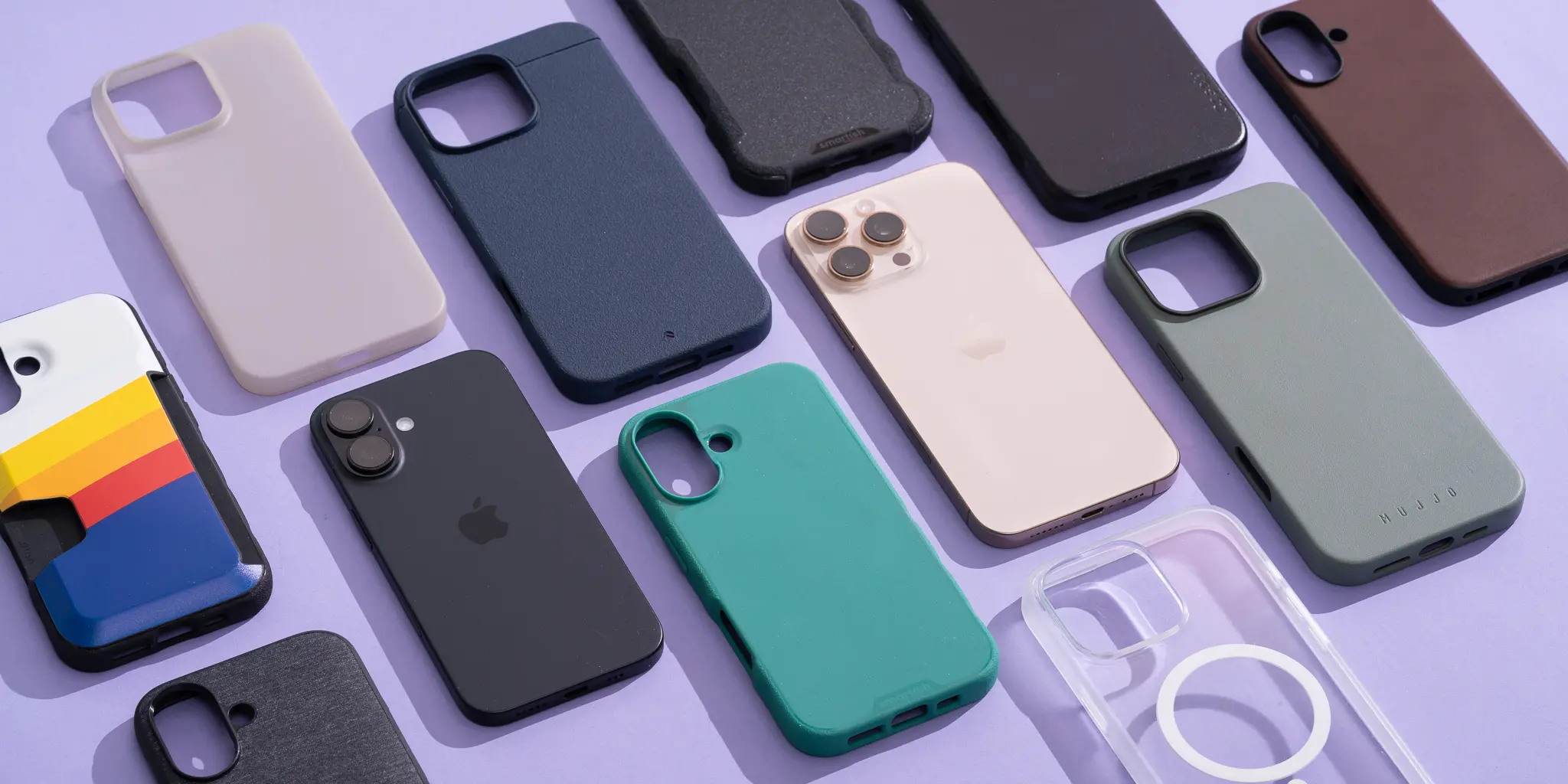
Apple’s iPhone 16e represents a shift in the “affordable” iPhone lineup, offering flagship power in a familiar chassis. However, when it comes to keeping that investment safe, you cannot simply grab any case off the shelf. The iPhone 16e has unique dimensions and specific quirks—most notably the absence of official MagSafe technology—that make choosing the right iphone 16e case trickier than usual.
Whether you are a remote worker relying on your phone for business or a casual user who hates bulky wallets, buying the wrong protector can lead to dropped calls (literally) or a broken screen. To help you navigate the market, here are the seven non-negotiable things you must check before adding that case to your cart.
Why the iPhone 16e Requires a Specialized Approach to Protection
Before we dive into the checklist, it is vital to understand the anatomy of the iPhone 16e. Unlike its premium siblings (the iPhone 16, 16 Plus, and 16 Pro), the 16e features a unique design with a single-lens camera system. It also has slightly different dimensions. While it shares the same screen size as the standard iPhone 16 (6.1 inches), the body is a fraction shorter .
This means a standard iPhone 16 case will not fit the 16e. You will find blocked camera holes or misfitting buttons. Furthermore, Apple made the controversial decision to omit the MagSafe magnet array from this model entirely . If you want to use a magnetic car mount or wallet, you need a case specifically engineered to compensate for this. Let’s look at exactly what to look for.
1. Magnetic Compatibility (The MagSafe Problem)
This is the most significant change for new iPhone 16e owners. The device supports Qi wireless charging, but it does not have the built-in magnets required for MagSafe accessories .
Why Standard Cases Won’t Cut It
If you buy a cheap, non-magnetic case, your phone will slide off your magnetic car mount or charging stand. It will also fail to align properly on a charger, leading to slow charging speeds (capped at 7.5W for the 16e) .
The Solution: Look for “Magnetic” or “MagSafe Compatible” Cases
When shopping for an iphone 16e case , you must specifically look for the terms “Magnetic Ring Built-in” or “MagSafe Compatible.” High-quality manufacturers like Spigen, ESR, and UAG have released versions of their cases that include a magnet array embedded in the back . This adds functionality the phone lacks.
| Feature | Without Magnetic Case | With Magnetic iphone 16e case |
|---|---|---|
| Car Mounts | Phone slips off | Secure lock |
| Wallet Attach | Impossible | Snaps on firmly |
| Charging Speed | 7.5W (misaligned often) | Optimal 7.5W (perfect alignment) |
Expert Tip: Even if you don’t use MagSafe today, buy a magnetic case. It future-proofs your setup for accessories you might buy next year.
2. Physical Fit and Camera Cutouts
Precision is everything. Since the iPhone 16e is a unique size, you must verify compatibility down to the millimeter.
The Single vs. Dual Camera Issue
The iPhone 16e features a single, 48MP Fusion camera lens housed in a small pill-shaped bump. The standard iPhone 16 has a vertical dual-camera array (two lenses inside a square bump) .
-
The Wrong Case: If you force an iPhone 16 case onto the 16e, the cutout will be too large, leaving ugly gaps for dust to enter. Worse, the case might cover the flash or microphone.
-
The Right Case: A dedicated iphone 16e case has a precise, smaller cutout that hugs the single lens, providing maximum protection against dust and scratches on the camera bump.
Port Alignment
Check that the case has large, precise cutouts for the USB-C port and the speaker grilles. Some ultra-cheap cases have smaller holes that block third-party charging cables (like Anker or Belkin cables which often have larger connector housings).
3. Drop Protection Standards (MIL-STD-810G)
Your phone will drop. It is a statistical certainty. The physics of a fall from pocket height (about 4 feet) onto concrete generates massive G-force. A case isn’t just about aesthetics; it is about shock absorption.
Understanding “Military Grade”
You will see terms like “Military Grade Drop Protection” or “MIL-STD-810G.” This is not just marketing fluff; it is a verified standard. According to UL Solutions, a phone encased in a verified protection case must withstand a 1.28-meter transit drop without losing cellular functionality or cracking the screen .
-
What to look for: Look for cases that specify drop heights. Good cases guarantee protection from 6 feet (like JETech) up to 16 feet (like UAG) .
-
The Tech: Look for TPU bumpers (thermoplastic polyurethane) on the corners. This material acts like a car bumper, compressing on impact to absorb the shock before it reaches your phone’s glass back.
. Material Science: Silicone vs. TPU vs. Polycarbonate
The feel of your phone in your hand dictates your daily user experience. You need to balance grip, durability, and sustainability.
Silicone Cases
-
Pros: Soft, great grip (won’t slip off a couch arm), and available in many colors.
-
Cons: Dust and lint magnets. If you put a silicone iphone 16e case in a tight jeans pocket, it will pull lint out of the fabric .
TPU (Thermoplastic Polyurethane)
-
Pros: Flexible, shock-absorbing, and often clearer than silicone.
-
Cons: Cheaper TPU will “yellow” within weeks due to UV exposure and heat.
-
Actionable Advice: If you want a clear case, look for “Anti-Yellowing Technology” or “Polycarbonate (PC) Back” with TPU edges. Brands like UAG offer “Plyo” cases with specific anti-yellowing coatings .
Hard Shell (Polycarbonate)
-
Pros: Rigid, scratch-resistant, stays clear forever.
-
Cons: Does not absorb shock well on its own. Best used in a hybrid design (PC back + TPU frame).
5. Raised Edges (Lip Protection)
A “case” that is flush with your screen is not a case; it is a back skin. You need a “lip.”
Screen and Camera Lips
When you place your phone face down on a table, you want the case to touch the table, not the glass.
-
Screen Lip: The front of your iphone 16e case should have a raised bezel (at least 1mm) surrounding the screen. This creates an air gap.
-
Camera Lip: The camera lens is usually the most expensive part of the phone to repair. The back of the case should have a raised ring or a lip around the camera cutout to keep the glass lens off the table surface .
Real-world scenario: You set your phone down on a granite countertop with a grain of sand under it. Without a lip, the weight of the phone grinds that sand into your screen. With a lip, the sand touches the plastic case, not the glass.
6. Additional Functionality (Wallets and Kickstands)
The iPhone 16e is positioned as a “daily driver” for many users. Adding functionality can replace other items in your pocket.
The Wallet Case
If you hate carrying a wallet, consider an iphone 16e case with a built-in card holder. However, be selective.
-
The Risk: Cases with a flap (folio style) can be bulky.
-
The Solution: Look for “Plating Wallet” cases that hold 2-4 cards flush against the back without adding a flap . These usually have a sliding door or a friction-fit slot. You can significantly reduce the number of items in your bag or pockets by integrating card storage .
The Kickstand
For media consumption, a case with a built-in kickstand is a game-changer. Modern designs use a “magnetic ring” that hides flush with the back when not in use but rotates 360 degrees to act as a stand or a finger grip . This is perfect for watching videos on a plane or in a hotel room.
7. Button Feel and Grip
Finally, do not ignore the tactile experience. Many rugged cases make the buttons hard to press.
Action Button Accessibility
The iPhone 16e features the Action Button (replacing the mute switch). A poorly designed case makes this button incredibly hard to press because it requires a deep push.
-
Check Reviews: Look for user feedback mentioning “clicky buttons.” Good cases have molded rubber buttons with internal guides.
-
Grip Texture: Look for cases with textured sides (like the Smartish Gripmunk) . A slippery case is a dangerous case. If you are prone to drops, a grippy texture is more important than drop-test numbers.
The Verdict: How to Choose Your Perfect iPhone 16e Case
To summarize, buying an iphone 16e case requires a different strategy than older iPhones. You cannot rely on Apple’s magnetic ecosystem; you must buy it from third parties.
| Your Lifestyle | Best Material | Must-Have Feature | Recommended Style |
|---|---|---|---|
| Business/Minimalist | Leather (or Cactus Leather) | Slim profile, precise cutouts | Wallet Case (2 cards) |
| Adventure/Clumsy | TPU/Rubber Hybrid | MIL-STD Drop rating (10ft+) | Rugged (Otterbox/UAG style) |
| Magnetic User | Hard PC + TPU | Built-in Magnetic Ring | MagSafe Compatible |
| Budget/Clear | Polycarbonate | Anti-Yellowing coating | Hybrid Crystal |
Conclusion
Your iPhone 16e is an investment in connectivity and productivity. While Apple has stripped away some features like MagSafe to hit a price point, the third-party accessory market has already filled the gap with innovative solutions.
The key takeaway is this: Do not buy an iPhone 16 case for your iPhone 16e. Insist on a model-specific fit. Prioritize a magnetic array if you use wireless charging in the car, and never compromise on the lip protection for the screen and camera.
By checking these seven points—magnetic compatibility, precise fit, drop rating, material quality, raised edges, added functionality, and button feel—you ensure your device survives the daily grind while looking good doing it. Don’t wait for a crack to appear; secure the right protection today and enjoy your new phone with total peace of mind.
Related posts:
![Surface Laptop 3 Cracked Screen]()
Dealing with a Surface Laptop 3 Cracked Screen: A Comprehensive Repair Guide
Tech Software![13-inch MacBook Pro Display Backlight Service Program: Complete Guide]()
13-inch MacBook Pro Display Backlight Service Program: Complete Guide
Tech Software![n8n http request node documentation]()
The Power of n8n HTTP Request Node Documentation for Seamless Automation
Tech Software![Hard Drive File Recovery: Restore Deleted Hard Drive Data Fast and Easily]()
Hard Drive File Recovery: Restore Deleted Hard Drive Data Fast and Easily
Tech Software![Best Budget Smartphones to Buy]()
What Are the Best Budget Smartphones to Buy in 2026?
Tech Software![macOS Golden Gate 27]()
What Is macOS Golden Gate 27 and What's New in the Update?
Tech Software